Hermes Agent hardware requirements

Hermes Agent runs around the clock, so it needs a machine that stays on and online, storage for its memory and skills, and a model: a cloud provider key, or a GPU to run models locally. ClawBox Hermes Edition is that machine, with Hermes Agent pre-installed.

What it needs, item by item
  • Built to order, ships from the EU in 1–3 working days
  • 30-day money-back guarantee
  • Two-year warranty

What Hermes Agent needs, and what ClawBox brings

Always on
Dedicated box, 7–15 W around the clock
CPU and memory
6-core Arm CPU, 8 GB LPDDR5
A GPU, for local models
1024 CUDA cores, 67 TOPS
Storage
512 GB NVMe SSD
Network
Gigabit Ethernet and Wi-Fi
Install and upkeep
Pre-installed, updated over the air

What Hermes Agent needs to run well

Nous Research publishes Hermes Agent as open-source software and does not sell hardware. Its documentation lists seven terminal backends (local, Docker, SSH, Singularity, Modal, Daytona and Vercel Sandbox), so the agent is not tied to one kind of machine. That is why this page lists what the job needs rather than a minimum spec: where your model runs decides most of the hardware.

Always on

Hermes Agent runs persistently: it keeps its memory between sessions, works on a schedule and answers your messages while you are away. It needs a machine that stays switched on and online.

On ClawBox: A dedicated box that draws 7–15 W, with an active, near-silent fan. It ships running Hermes Agent only, so the machine has one job.

CPU and memory

The agent itself is a Python program that plans, calls tools and keeps its memory. The heavy computing is the model's: with a cloud provider, the model runs on the provider's servers, not on your machine.

On ClawBox: 6-core Arm Cortex-A78AE CPU and 8 GB of LPDDR5 memory, shared by the CPU and the GPU.

A GPU, for local models

To run models on the machine itself, with no API key and nothing to pay per token, you need a GPU. CPU-only VPS plans have no usable GPU for this.

On ClawBox: An NVIDIA Ampere GPU with 1024 CUDA cores: 67 TOPS. Local models run through Ollama, with granite4:micro-h as the shipping default.

Storage

Hermes Agent keeps its configuration, skills and long-term memory on the machine it runs on, and local models need room of their own.

On ClawBox: A 512 GB NVMe SSD.

Network

It needs a steady connection to reach your model provider and the chat apps you talk to it through, such as Telegram.

On ClawBox: Gigabit Ethernet and Wi-Fi. No exposed ports by default, and you still get full root and SSH access.

Install and upkeep

Someone has to install Hermes Agent, connect a model and your chat channels, and keep the agent and the machine patched as new releases ship.

On ClawBox: Hermes Agent arrives installed and hardened. Releases are pinned, tested on the same hardware and delivered over the air, with security fixes fast-tracked.

Where to run Hermes Agent: a VPS, a Mac Mini, your own PC or ClawBox

All four can run Hermes Agent. What differs is what you pay, where it runs and who looks after it.

Four ways to run Hermes Agent, compared on cost, uptime, local models, location and upkeep
Compared onRented VPSMac MiniYour own PCClawBox Hermes Edition
What you payMonthly rent for as long as it runs: €16€24 a month for the CPU-only plans in our cloud VPS comparisonA one-off purchase, or nothing extra if you already own oneNothing up front: it is hardware you already have€749 once, with no subscription required
Stays on 24/7Yes, that is what it is forIf you leave it switched on and awakeOnly while it is switched on and awakeYes, at 7–15 W with a near-silent fan
Local models, no API keyNo usable GPU on CPU-only plansRuns on Apple silicon, which has no CUDADepends on its graphics cardYes: 1024 CUDA cores, 67 TOPS, Ollama built in
Where it runsIn someone else's data centreOn your desk, on your networkAt home, on your networkOn your desk, on your network
Who installs and updates Hermes AgentYouYouYouPre-installed; tested releases arrive over the air
A good fit ifYou already run servers and want nothing at homeYou already own one and can dedicate it to the agentYou want to try Hermes Agent on hardware you already haveYou want Hermes Agent running on hardware you own, without maintaining it

Swipe the table sideways to see all four options.

The numbers behind each alternative, worked through in full: ClawBox vs cloud VPS, ClawBox vs Mac Mini and ClawBox vs home server.

Hermes Agent install: do it yourself, or unbox it installed

Installing Hermes Agent yourself is a perfectly good answer if the building is the point. Here is what each path involves.

Yourself, on a VPS, a Mac or a PC

  1. Choose a machine that can stay on around the clock: rent a VPS, or dedicate a computer you own.
  2. Install Hermes Agent from Nous Research's open-source repository on GitHub.
  3. Connect a model: an API key from a cloud provider, or a local model server such as Ollama on a machine with a suitable GPU.
  4. Connect chat channels such as Telegram, then keep the agent, the operating system and the machine patched.

Source: Hermes Agent on GitHub

On ClawBox Hermes Edition

  1. Plug it in. On first boot the box raises its own Wi-Fi access point.
  2. Join it from your phone. A five-screen wizard covers welcome, security, Wi-Fi, provider and Telegram.
  3. Pick a provider (Anthropic, OpenAI, DeepSeek, z.AI, MiniMax, OpenRouter or a Nous Portal subscription), or run local models through Ollama with no key at all.
  4. Updates come through Settings → System Update. No keyboard, no monitor, no terminal, no Docker.

On the box, Hermes Agent lives at ~/.local/bin/hermes with its configuration in ~/.hermes, and Hermes Agent's own dashboard opens behind your normal ClawBox login. Read the Hermes Edition docs.

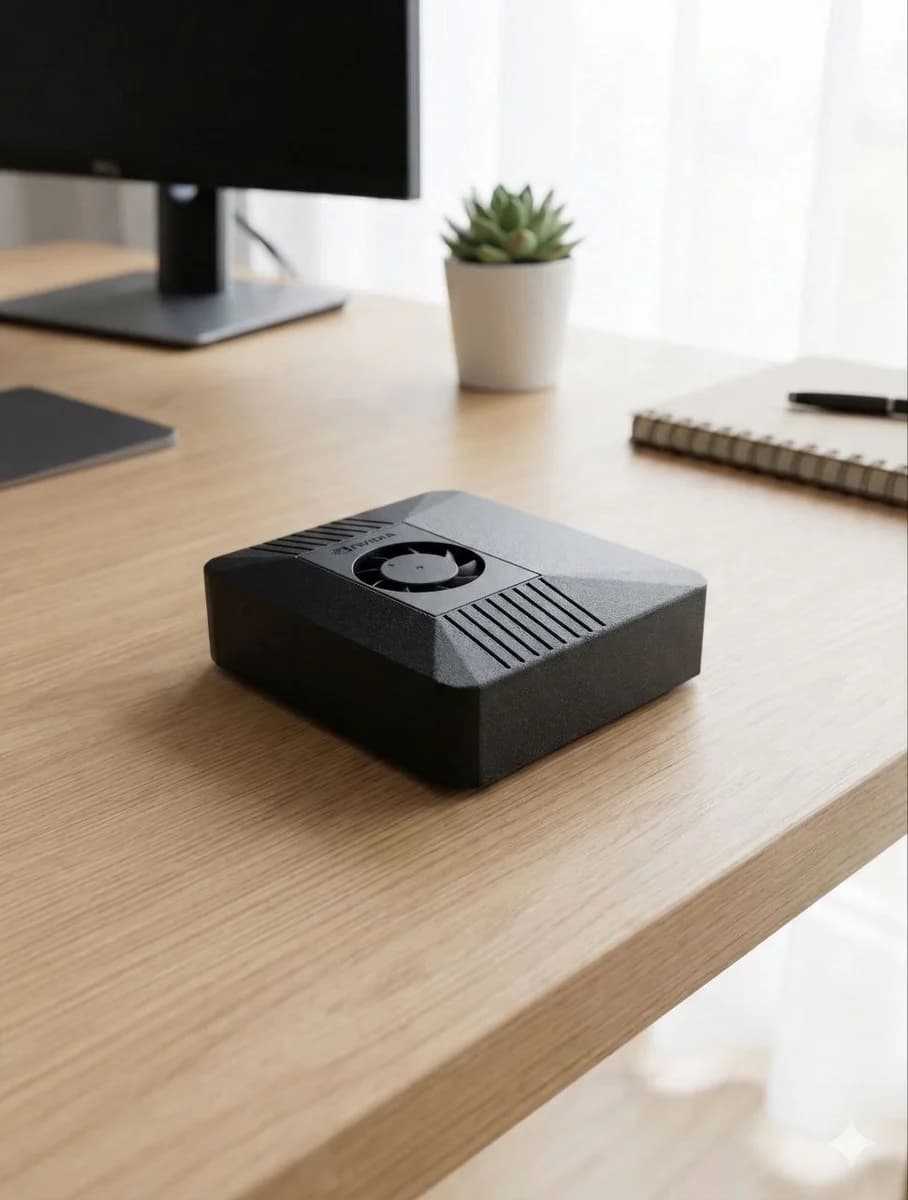
ClawBox Hermes Edition: a compact carbon-fibre box built on an NVIDIA Jetson Orin Nano Super

ClawBox Hermes Edition, spec by spec

The same NVIDIA Jetson Orin Nano Super platform as every ClawBox, shipped running Hermes Agent.

Platform
NVIDIA Jetson Orin Nano Super
AI performance
67 TOPS
GPU
1024 CUDA cores, Ampere
CPU
6-core Arm Cortex-A78AE
Memory
8 GB LPDDR5 unified
Storage
512 GB NVMe SSD
Networking
Gigabit Ethernet, Wi-Fi
Ports
USB 3.0, HDMI, USB-C power
Power draw
7–15 W
Cooling
Active — optimized fan, near-silent
Dimensions
100 × 79 × 31 mm
OS
ClawBox OS (JetPack 6, Ubuntu 22.04)

Questions about Hermes Agent hardware

What are the minimum hardware requirements for Hermes Agent?

Nous Research publishes Hermes Agent as open-source software, and its documentation lists seven terminal backends (local, Docker, SSH, Singularity, Modal, Daytona and Vercel Sandbox), so the agent is not tied to one machine. What it needs is a machine that stays on, a network connection, storage for its memory and skills, and a model: a cloud provider account, or a GPU if you want to run models locally. ClawBox Hermes Edition covers all of that with an NVIDIA Jetson Orin Nano Super: 8 GB LPDDR5, a 512 GB NVMe SSD and a 67 TOPS GPU.

Can I run Hermes Agent on a VPS?

Yes. A VPS keeps Hermes Agent online, and you install, connect and patch it yourself. You pay rent every month for as long as it runs, and CPU-only plans have no usable GPU for local models, so you would pair it with a cloud model provider. Our cloud VPS comparison works through the costs.

Can I run Hermes Agent on a Mac Mini or my own PC?

Yes, if you install it yourself and keep the machine switched on and awake around the clock. A Mac Mini runs on Apple silicon, which has no CUDA; on your own PC, local models depend on its graphics card. ClawBox Hermes Edition is the ready-to-run alternative: a dedicated 7–15 W box with Hermes Agent pre-installed.

Does Hermes Agent need a GPU?

Not if you use a cloud provider: the model then runs on the provider's servers and your machine only runs the agent. To run models locally, with no API key and nothing to pay per token, you need a GPU. ClawBox has an NVIDIA Ampere GPU with 1024 CUDA cores (67 TOPS) and runs local models through Ollama, with granite4:micro-h as the shipping default.

How do I install Hermes Agent on ClawBox?

You do not have to. ClawBox Hermes Edition arrives with Hermes Agent installed and hardened. On first boot the box raises its own Wi-Fi access point; join it from your phone and a five-screen wizard covers welcome, security, Wi-Fi, provider and Telegram. No keyboard, no monitor, no terminal, no Docker.

How much does ClawBox Hermes Edition cost?

€749 one-time, built to order and shipped from the EU within 1–3 working days. No ClawBox AI plan is included or required: bring your own provider key, billed by that provider directly, or run local models on the box. It comes with a two-year warranty and a 30-day money-back guarantee.
Get Hermes Agent running on hardware you own

ClawBox Hermes Edition, €749 once. Plug it in, pair your phone, pick a model.

Explore ClawBox Hermes Edition
  • Hermes Agent pre-installed and hardened on NVIDIA Jetson Orin Nano Super hardware
  • No ClawBox AI plan included or required: bring your own provider key, billed by that provider directly
  • Built to order and shipped from the EU within 1–3 working days
  • Two-year warranty and a 30-day money-back guarantee

Hermes Agent is an independent open-source project by Nous Research; ClawBox Hermes Edition is not affiliated with, endorsed by, or sponsored by Nous Research. Not affiliated with Hermès International S.A.