
ClawBox Review: Is It Worth 749 €?
Honest Pros, Cons & Real User Experience — 2026
We put ClawBox through its paces — from unboxing to daily use. Here's our honest take on the dedicated AI assistant hardware powered by NVIDIA Jetson Orin Nano.
What is ClawBox?
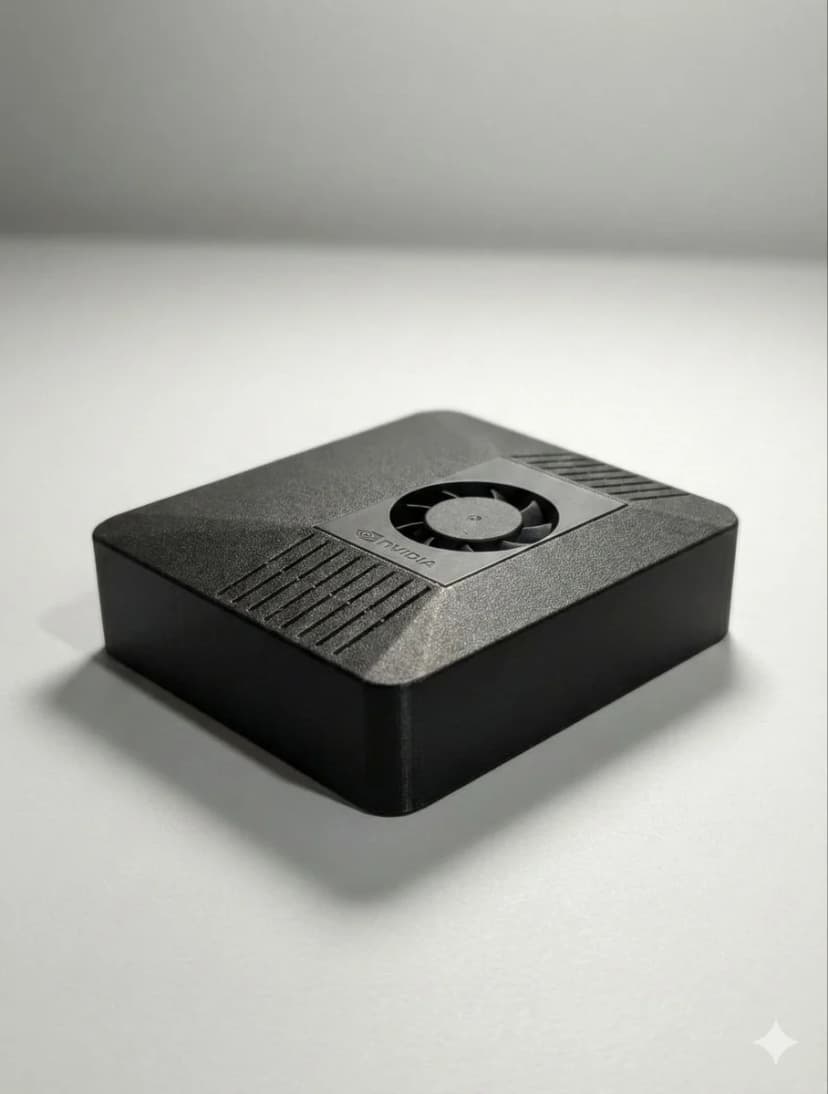
ClawBox is a purpose-built AI assistant device made by OpenClaw Hardware. It's a compact, fanless box powered by the NVIDIA Jetson Orin Nano 8GB with OpenClaw pre-installed — the source-available AI assistant platform that connects to Telegram, WhatsApp, Discord, and more. New to the software side? Our plain-English guide to what OpenClaw is covers what the assistant actually does all day.
Think of it as a dedicated mini-server for your personal AI. It runs 24/7 on just 15 watts, handles browser automation, proactive scheduling, and multi-platform messaging — all without sending your data to the cloud.
At 749 €, it's positioned as the plug-and-play alternative to building your own Jetson setup or repurposing a Mac Mini. But is it worth the price? Let's dive in.
ClawBox Specifications
| Spec | Details |
|---|---|
| Processor | NVIDIA Jetson Orin Nano |
| AI Performance | 67 TOPS (INT8) |
| GPU | 1024 CUDA cores + 32 Tensor cores |
| RAM | 8GB LPDDR5 |
| Storage | 512GB NVMe SSD |
| Power Draw | 7–15W typical |
| Software | OpenClaw pre-installed & configured |
| Connectivity | WiFi, Ethernet, USB 3.0, HDMI |
| Form Factor | Compact fanless enclosure |
| Warranty | 2-year warranty + 30-day money-back guarantee |
✅ What We Like
100% Local & Private
Your data never leaves the device. No cloud subscriptions, no data harvesting. Perfect for privacy-conscious users who want AI without the surveillance.
Always-On at 15W
ClawBox sips power like a phone charger. Leave it running 24/7 for about 15 €/year in electricity. It's always ready — no boot-up waits, no spinning up VMs.
5-Minute Setup
Plug in, connect WiFi, scan a QR code. That's it. OpenClaw is pre-configured with all integrations. No Linux terminal wizardry required.
Browser Automation Built-In
ClawBox can browse the web for you — check prices, fill forms, monitor pages. This alone justifies the hardware for many power users.
Multi-Platform Messaging
One AI assistant across Telegram, WhatsApp, Discord, and more. Send it a message from any platform and get intelligent responses backed by your configured AI models.
67 TOPS AI Performance
The NVIDIA Jetson Orin Nano delivers real AI horsepower — enough for local inference, voice processing, and running smaller language models natively.
⚠️ What Could Be Better
8GB RAM Limits Large Local Models
While 8GB is fine for 7B parameter models and smaller, you won't be running 70B models locally. For the biggest open-source LLMs, you'll still want to pair ClawBox with a cloud API (OpenAI, Anthropic, etc.). The hybrid approach works, but pure offline enthusiasts may find this limiting.
Premium Claude Reasoning Uses the Cloud
ClawBox runs smaller models locally, and connects to Claude through Anthropic's API for frontier reasoning. That's the intended best-of-both-worlds setup: local OpenClaw for privacy and always-on automation, Claude for the hardest analysis, writing, coding, and business tasks.
Premium Price vs DIY
At 749 €, ClawBox costs more than buying a bare Jetson Orin Nano (~250 €) and setting it up yourself. You're paying for the pre-configuration, enclosure, 512GB SSD, support, and the 'it just works' factor. If you enjoy Linux tinkering, DIY can save money. If your time is worth something, ClawBox saves hours.
Who Is ClawBox For?
Privacy-Conscious Users
If some of your notes, files, or business data should stay in the building, ClawBox is for you. Sensitive work stays on your hardware — and GPT or Claude are one click away for everything else.
OpenClaw Enthusiasts
Already using OpenClaw on a VPS or laptop? ClawBox gives it a permanent, dedicated home. No more competing with your other tasks for resources.
Non-Technical Users
Want a personal AI assistant without learning Docker, Linux, and networking? ClawBox's 5-minute setup means anyone can get started — no terminal required.
ClawBox Alternatives Compared
| 🦞 ClawBox | Mac Mini M4 | RPi 5 | Cloud VPS | DIY Jetson | |
|---|---|---|---|---|---|
| Price | 749 € | 699 €+ | 100–150 € | 20 €+/mo | 300–400 € |
| AI TOPS | 67 TOPS | 38 TOPS | 13 TOPS | Varies | 67 TOPS |
| Power Draw | 7–15W | 40–65W | 5–12W | N/A | 7–15W |
| Setup Time | 5 min | Hours | Hours | 30+ min | 10+ hours |
| OpenClaw Pre-installed | ✅ Yes | ❌ No | ❌ No | ❌ No | ❌ No |
| Privacy (Local) | ✅ 100% | ✅ Possible | ✅ Possible | ❌ Cloud | ✅ Possible |
| Support | ✅ Included | ❌ DIY | ❌ DIY | ❌ DIY | ❌ DIY |
| Always-On Ready | ✅ Built for it | ⚠️ Not ideal | ⚠️ SD card risk | ✅ Yes | ⚠️ DIY config |
ClawBox wins on convenience and purpose-built design. DIY saves money if you have the skills and time. For a deeper breakdown of every option, see the full ClawBox alternatives guide.
De personas que dejaron de chatear con la IA y empezaron a delegarle
“La configuración fue literalmente plug and play. Tuve mi asistente de IA funcionando en menos de 5 minutos. Sin terminal, sin archivos de configuración: simplemente funciona.”
“Por fin, un asistente de IA que no envía mis datos a las grandes tecnológicas. El diseño que prioriza la privacidad era exactamente lo que necesitaba para mi trabajo de consultoría.”
“Me encanta esta cosa, ¡puede que me vuelva adicto! Acabo de pedir dos más para mis compañeros de trabajo.”
More reviews coming as ClawBox ships to early customers in Q2 2026.
The Verdict
4.5 / 5 — Recommended
ClawBox delivers exactly what it promises: a dedicated, always-on, private AI assistant that anyone can set up in minutes. The NVIDIA Jetson Orin Nano provides genuine AI horsepower, and OpenClaw's multi-platform integration makes it immediately useful.
The 8GB RAM is the main local-model boundary, which is why the Claude integration matters. ClawBox keeps OpenClaw, files, memory, automation, and routine inference local, then brings in Anthropic's premium reasoning for the hardest work.
If you want a dedicated AI assistant without the DIY headaches, ClawBox at 749 € is an easy recommendation.
ClawBox Review FAQ
Is ClawBox worth buying in 2026?▾
What are the pros and cons of ClawBox?▾
How does ClawBox compare to Mac Mini for AI?▾
Can ClawBox run ChatGPT locally?▾
How long does ClawBox setup take?▾
What are the best ClawBox alternatives?▾
¿Listo para cambiar?
Deja de comparar, empieza a construir. ClawBox es hardware de IA plug-and-play, listo en 5 minutos.
✓ Pago seguro vía Stripe