
OpenClaw hårdvarukrav (2026)
Vad behöver du för att köra OpenClaw?
Från 4GB-minimum till den rekommenderade 67-TOPS-uppsättningen — de specifikationer OpenClaw faktiskt behöver, och den förkonfigurerade boxen där du slipper installationen.
📅 Updated March 2026
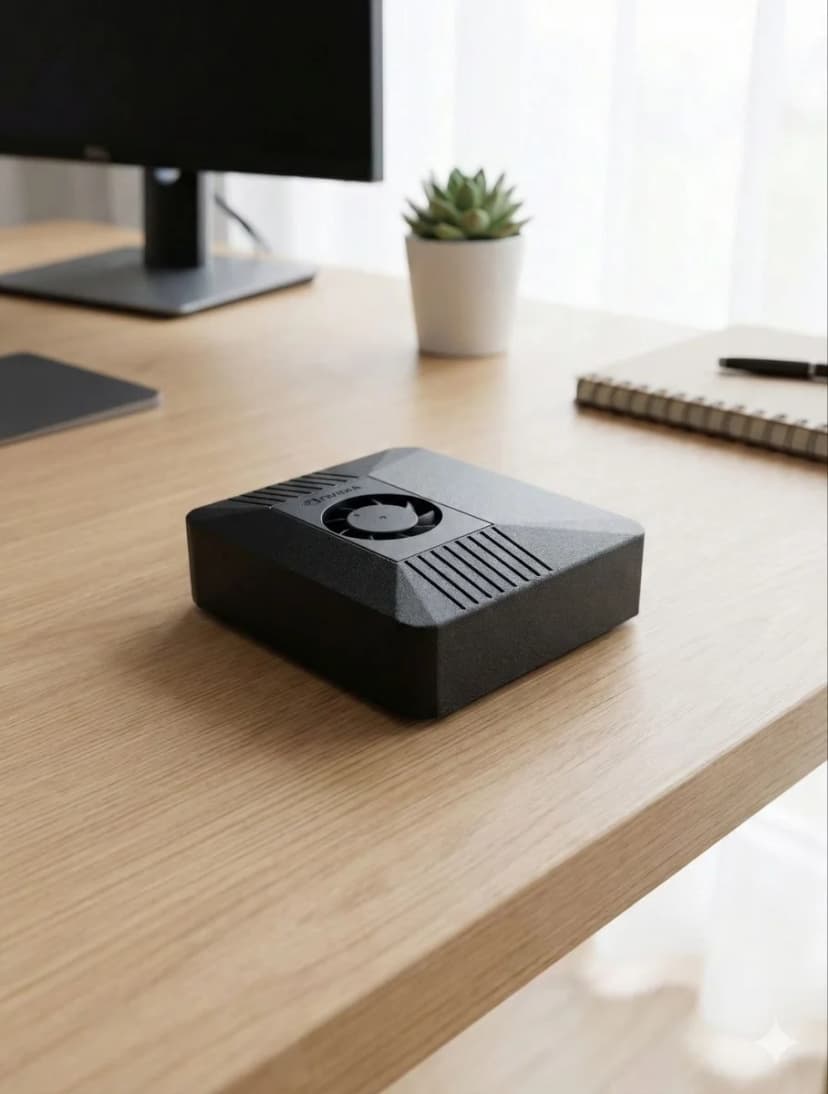
With OpenClaw v2026.3.14 and NemoClaw from NVIDIA, hardware requirements have evolved. The minimum specs remain 4GB RAM and Node.js 20+, but for the best experience with browser automation, multi-agent workflows, and voice pipelines, we now recommend dedicated hardware with NVIDIA CUDA support. The Jetson Orin Nano remains the sweet spot — 67 TOPS of AI compute at just 15W, enough for simultaneous LLM inference, browser automation, and voice processing.
Need the recommendation, not just the specs?
This page explains minimum and recommended specs. If you want the final buying answer, read our guide to the best OpenClaw hardware, where we compare ClawBox, Raspberry Pi, Mac Mini, and other always-on AI setups. For the 2026 buying decision — mini PC vs Jetson vs Mac mini vs ClawBox, with real power costs and setup times — see our full comparison guide. Prefer measured numbers over spec-sheet claims? See the real local-LLM benchmark from a production ClawBox — 22–45 tokens/sec at under 20 watts. And if you're still wondering what OpenClaw actually is, our explainer covers the assistant itself before you pick hardware for it.
ClawBox specifikationer
Allt du behöver veta om ClawBox hårdvara
AI-prestanda
67 TOPS
NVIDIA Jetson Orin Nano Super with dedicated AI accelerator
GPU
1024-core Ampere GPU
625 MHz base clock, 40.96 GB/s memory bandwidth
Minne
8GB LPDDR5
102.4 GB/s bandwidth, unified CPU/GPU memory
Lagring
512GB NVMe SSD
PCIe Gen3 x4, 2,100 MB/s read speed, pre-installed
Effekt
7-25W
15W typical operation, 19 V barrel-jack power supply included
Anslutning
WiFi 5 + Bluetooth 5.0
Dual-band 802.11ac, Gigabit Ethernet port
Portar
USB-A, USB-C, HDMI, Ethernet
USB-C is for data, not power; 19 V DC barrel power input, microSD slot, 40-pin GPIO header
Storlek
100 × 79 × 31mm
Compact carbon color case, 260g total weight
AI-modellprestanda
Vad du kan köra på ClawBox
| Modell | Hastighet | Kvalitet |
|---|---|---|
| Llama 3.2 1B (Q4) | ~45 tok/s | Fast |
| Gemma 2 2B (Q4) | ~26 tok/s | Good |
| Qwen2.5 3B (Q4) | ~23 tok/s | Excellent |
| Phi-3 Mini 3.8B (Q4) | ~22 tok/s | Excellent |
| 7–8B class (Q4) | ~10 tok/s | Tight fit |
För större modeller, använd BYOK med moln-API:er (Claude, GPT, Gemini).
Vad ingår
Hårdvara
- ✓ NVIDIA Jetson Orin Nano Super
- ✓ 512GB NVMe SSD (förinställd)
- ✓ Kolfärg-hölje
- ✓ 19 V-nätadapter med rund DC-kontakt (kontakt eller adapter för din region)
- ✓ Ethernet och WiFi-klar
Programvara
- ✓ Ubuntu 22.04 LTS
- ✓ Förinställd OpenClaw
- ✓ Redo för webbläsarautomation
- ✓ Röstpipeline konfigurerad
- ✓ Gratis programuppdateringar
Effektkrav
7W viloläge
7W
15W typisk
15W
25W max
25W
Den medföljande 19 V-nätadaptern med rund DC-kontakt är allt du behöver.
OpenClaw serverkrav
Vad en headless, alltid-på OpenClaw-installation faktiskt behöver
Att köra OpenClaw som server — ingen skärm, bara en alltid-på-maskin du når via Telegram eller WhatsApp — är så de flesta faktiskt använder det. Kraven är blygsamma, men de är verkliga: agenten håller en webbläsare, en Node.js-runtime och ofta en lokal modell varma dygnet runt.
| Komponent | Minimum | Rekommenderat |
|---|---|---|
| RAM | 4GB | 8GB gemensamt minne (för lokala AI-modeller) |
| CPU | 2 kärnor (x86_64 eller ARM64) | 4+ kärnor, eller Jetson med CUDA |
| Lagring | 20GB ledigt | 50GB+ NVMe SSD |
| OS & runtime | Linux med Node.js 20+ | Headless Ubuntu LTS, Node.js 20+ |
En billig VPS klarar minimikraven på pappret, men delade vCPU:er och burstbar RAM räcker inte i praktiken: webbläsarautomation får CPU:n att spika, lokala modeller kräver riktig minnesbandbredd, och drift dygnet runt på hyrd infrastruktur betyder att din agent — och dess data — bor i någon annans moln.
Det förkonfigurerade alternativet: ClawBox är en 67-TOPS Jetson-server med OpenClaw redan installerat, trimmad för exakt den här arbetslasten på 15W. Se vad ClawBox gör →
Why Dedicated Hardware for OpenClaw?
Running OpenClaw on dedicated hardware vs shared VPS or your daily-use computer
✓ Dedicated Hardware
- ✓24/7 uptime — your AI assistant never sleeps. Heartbeat checks, scheduled tasks, and proactive monitoring run around the clock without interruption.
- ✓No resource competition — CPU, GPU, and RAM are 100% dedicated to OpenClaw. No other apps fighting for memory or causing unexpected slowdowns.
- ✓Consistent performance — predictable response times for AI inference, voice processing, and browser automation. No “noisy neighbor” problems.
- ✓Lower long-term cost — ClawBox at 749 € one-time vs VPS at 20–40 €/month (720–1 440 € over 3 years). The hardware pays for itself in 19–38 months.
- ✓True privacy — your data stays on your physical hardware, on your network. No cloud provider has access to your conversations, files, or automations.
✗ Shared VPS / Your Laptop
- ✗Downtime when you close your laptop — OpenClaw stops when your computer sleeps, restarts, or runs out of battery.
- ✗Resource contention — browser tabs, Slack, VS Code all compete with OpenClaw for RAM and CPU. Performance degrades unpredictably.
- ✗VPS costs add up — a GPU-capable VPS costs 40–80 €/month. Over 3 years that's 1 440–2 880 € — far more than dedicated hardware.
- ✗No local AI inference — most VPS providers don't offer GPU access. You're stuck with cloud API calls only.
The ideal dedicated hardware for OpenClaw: NVIDIA Jetson Orin Nano at just 15W.
67 TOPS of AI performance, fanless operation, always-on by design. ClawBox packages this with a 512GB NVMe SSD, carbon color case, and OpenClaw pre-installed — ready in 5 minutes.
Frequently Asked Questions
What are the minimum hardware requirements for OpenClaw?▼
What is the best hardware for OpenClaw?▼
Can I run OpenClaw on a Raspberry Pi?▼
Does OpenClaw require a GPU?▼
What is the best device for OpenClaw?▼
What are the OpenClaw system requirements for local AI models?▼
Can I build my own computer for OpenClaw instead of buying ClawBox?▼
What is the best mini PC for OpenClaw?▼
What hardware do I need to run OpenClaw?▼
What are the OpenClaw server requirements?▼
What do I need to run OpenClaw?▼
How big is OpenClaw / the ClawBox?▼
Ready to Get Started?
ClawBox comes with everything you need — pre-installed, pre-configured, ready in 5 minutes.
30-day money-back guarantee · Ships to 30+ countries · DHL Express